
Misskey.art Features
About this translation
This is an English translation provided for reference. If there is any difference between this translation and the Japanese version, the Japanese version takes precedence.
Misskey.art is based on Misskey, with features and settings of its own added.
This page introduces the features that are unique to Misskey.art and differ from other Misskey servers.
"ART" badge
Items with the "ART" badge in menus and elsewhere are features unique to Misskey.art.
Sign-Up Approval
Misskey.art may require approval for new sign-ups.
When approval is required, the top page (the screen shown when you are not signed in) and the sign-up screen say "Sign-ups on this server require approval", and you can use your account only after the administrators approve it.
When approval is required, signing up works as follows.
- On the top page, press "Apply to join" and enter your username, email address, and other details. If there is a "Reason for signing up" field, fill it in, and then press "Apply".
The administrators read the reason when they review your application. It is not shown to other users. - A confirmation email is sent to the email address you entered. When you open the link in the email, your application is sent for review by the administrators (the link expires in 30 minutes).
- Wait for the administrators to review it. The result is also sent to you by email.
- Once approved, you can sign in.
If you try to sign in before your account is approved, a screen tells you that it has not been approved yet.
Checking the review status
When approval is required, you can check the review status from "Check sign-up review status" on the top page.
If you applied on the same device, you can check it right away. To check it on another device, you need the "check code", so keep a note of the check code shown after you apply.
If your application is declined, you can see the reason on this page.
Email addresses you cannot use
Disposable email addresses cannot be used to sign up.
Email addresses already used by other accounts cannot be used either.
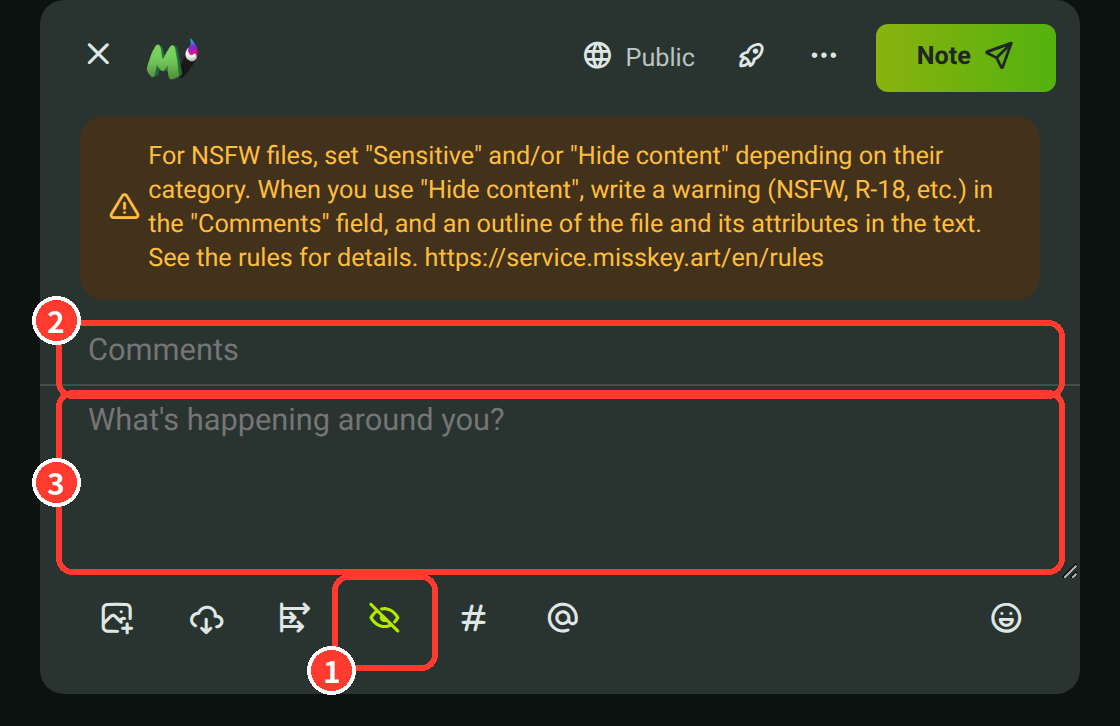
Rule Reminder in the Posting Form
When you turn on "Hide content" or attach a file, the posting form shows a reminder about the rules for posting NSFW content.
Before posting NSFW works, check that the required settings are in place. See the NSFW Guidelines for details.
Reactions to Announcements
You can react to announcements from the administrators with emoji.
Right-click (or long-press) a reaction, or press "More!", to see the list of users who reacted.
There is a limit to the number of different reactions on a single announcement.
Follows from New Accounts
On Misskey.art, follows from accounts created less than 1 day ago (for accounts on other servers, less than 1 day since Misskey.art first saw them) are not accepted right away, and arrive as follow requests instead (with the default settings).
You can approve or reject follow requests from your notifications or from "Follow requests".
You can change this period in "Settings" → "Privacy" → "Require approval for follows from new accounts".
If you choose "Use default", Misskey.art's default (currently 1 day) is used.
Other
The menu that opens when you press the server icon at the top left of the screen has the following differences.
- It has a link to this site (Service Misskey.art).
- You can see the source code of Misskey.art from "About Misskey".
- The clicker in "Tools" is a pudding 🍮 instead of a cookie.